


Listen
Audio version
Document Processing Workflows That Work
I know what your document processing pipeline looks like.
There is a Python script. It parses invoices with regex. It breaks every time a vendor moves their logo three pixels to the left, which somehow shifts the invoice number to a different line. There is a shared Google Sheet where someone manually copies extracted data into the ERP because the "automated" part ends at a JSON dump in S3. There is a Slack channel called #doc-processing-errors that everyone has muted.
You have tried the obvious fix. Called the OpenAI API. Fed it sample invoices. Got clean extractions. Showed leadership. Everyone nodded.
Then you tried to ship it.
What happens when a scanned document is half-illegible because someone faxed it? (Yes. Fax. 2024. Still happening.) What do you do when the model extracts an invoice amount with 83% confidence? Just hope? Who reviews the weird ones? How does any of this reach your accounting system without yet another brittle integration you will be maintaining at 2am?
The gap between "AI can read a document" and "we have a production-grade intelligent document processing workflow" is the gap between a Jupyter notebook and something that processes 500 invoices a day without waking anyone up.
This guide is about closing that gap. Not with theory. With architecture.
What "Intelligent" Actually Means Here
The word has been beaten to death so let me be specific.
Traditional document processing is coordinate-based. "The invoice number lives at position (x, y)." Regex patterns. Templates per vendor. Works until anything changes, which is always.
An intelligent document processing workflow understands documents instead of scanning them. Four things make the difference:
Adaptive extraction. "Net 30" means payment terms whether it is in the header, footer, or buried in paragraph six. Context, not coordinates.
Confidence scoring. Every extraction comes with a reliability number. The system knows what it does not know. Most POCs skip this entirely and then wonder why production accuracy is garbage.
Learning from corrections. A human fixes an error. That fix becomes a training signal. Without this loop, your accuracy is a flat line forever.
Graceful failure. Multi-page contracts, tables inside paragraphs, handwritten notes, coffee stains on the total. The system handles it or honestly says "I don't know" instead of silently guessing wrong.
These require a layered architecture. Four layers: Ingestion, AI Processing, Validation and Routing, Integration. Each does one job. Native AI components handle the complexity at every stage so you are not writing plumbing code while Ginger stares at your screen with visible disappointment.
Layer 1: Document Ingestion (The Layer Everyone Skips)

Before AI can do anything, documents need to arrive in a format the system can work with.
Here is what actually shows up: PDFs from 14 different tools. Phone photos at weird angles. Scans where the DPI varies page to page. Emails with documents in the body, not attached. Multi-page contracts where page 7 is rotated because the scanner jammed.
Three things need to happen:
Format normalization. Everything, regardless of source chaos, converts into one consistent format. Native AI components handle PDF parsing, OCR, and email extraction in a single step. You do not maintain separate paths for each format. (You will try to. You will regret it.)
Pre-processing. Deskewing, contrast enhancement, noise removal. Skip this and your demo accuracy will not match production. Ask me how I know.
Automatic classification. The system figures out what it is looking at before extracting anything. Invoices need different logic than contracts or support tickets. Native AI components classify on content, not filenames. Because relying on users to name files correctly has never worked in the history of computing.
Layer 2: Extraction That Actually Understands Things
This is where everyone starts and where native AI components create the biggest gap over hand-rolled solutions.
Regex had a good run. But the moment a new vendor shows up or an existing one updates their template, everything collapses.
AI-powered extraction flips it. You tell the system WHAT to find, not WHERE. It locates "invoice number" regardless of label ("Invoice #", "Inv No.", "Reference Number", or my personal favorite, just the number floating there with no label at all).
Context over coordinates. A purchase order has "Ship To" and "Bill To" addresses. Regex sees two addresses and panics. AI understands which is which. Not magic. Just what happens when you stop treating documents as grids of characters.
Structured output. Raw extraction gives you "the payment terms are net thirty days from the invoice date." Your systems need { "payment_terms_days": 30 }. Native AI components enforce schemas at the extraction step. No parsing layer. No post-processing scripts.
Complex documents. Multi-page invoices with line item tables, tax summaries, fine-print terms. AI processes holistically. It knows $4,200 in a line item column is a line total, not the invoice total. Because context.
In practice, extraction becomes configuration:
That replaces hundreds of lines of extraction code. New vendor format? The AI adapts. You do not rewrite anything.
Layer 3: Confidence Scoring and Human-in-the-Loop
This layer separates systems from science projects.
Most DIY pipelines die here. Not dramatically. They just quietly produce wrong data that nobody catches for weeks until the accountant notices numbers do not add up.
AI extraction is not perfect. Pretending otherwise creates errors more expensive than the manual process you replaced. So you build a graduated response:
High confidence (above threshold). Auto-approved. No human touches it. Covers 70-85% of volume for well-structured docs. That is your automation win.
Medium confidence. Specific fields get flagged. A reviewer sees the original document next to extracted values, corrects what needs correcting, moves on. 10-20% of volume.
Low confidence. Manual processing. The system says "I genuinely do not know" instead of guessing. That honesty is a feature.
The feedback loop is what makes this intelligent over time. Every correction is a training signal. Reviewer fixes "Acme Corp" to "Acme Corporation Inc."? System learns the pattern. Six months later, documents that needed review sail through automatically. The system gets smarter while you sleep. (Olive also sleeps. On my keyboard. She does not get smarter. But she is warm, so she stays.)
In a workflow builder, this entire layer is configuration. Thresholds, review interfaces, feedback loops, queue management. Not a custom application you build from scratch just to support your document pipeline. That is the kind of yak-shaving that kills projects.

Layer 4: Validation, Routing, and Integration
Extraction gets the glory. This layer does the work.
Business rule validation catches what AI confidence cannot. AI correctly reads $50,000 on an invoice. Great. But business logic knows this vendor typically invoices $5K-$15K. Probably right. Deserves a second look. Two layers of confidence: AI says "I read this correctly." Business rules say "this makes sense in context."
Conditional routing makes the workflow yours. Under $10K, auto-route to payment. Over $10K, manager approval via Slack. Flagged clause goes to legal. Unrecognized vendor triggers onboarding. Your org's decision-making, not a generic template.
Native integrations connect routing decisions to your existing systems. Database writes, Slack notifications to the right team, payment processing, audit logs. All configuration. Not six separate integration projects with auth tokens and retry logic and monitoring.
Auto-testing makes it production-ready. Test documents run through the pipeline, results compare against known-good values, you get alerted when accuracy drifts. Catches model degradation and config errors before they touch real documents.
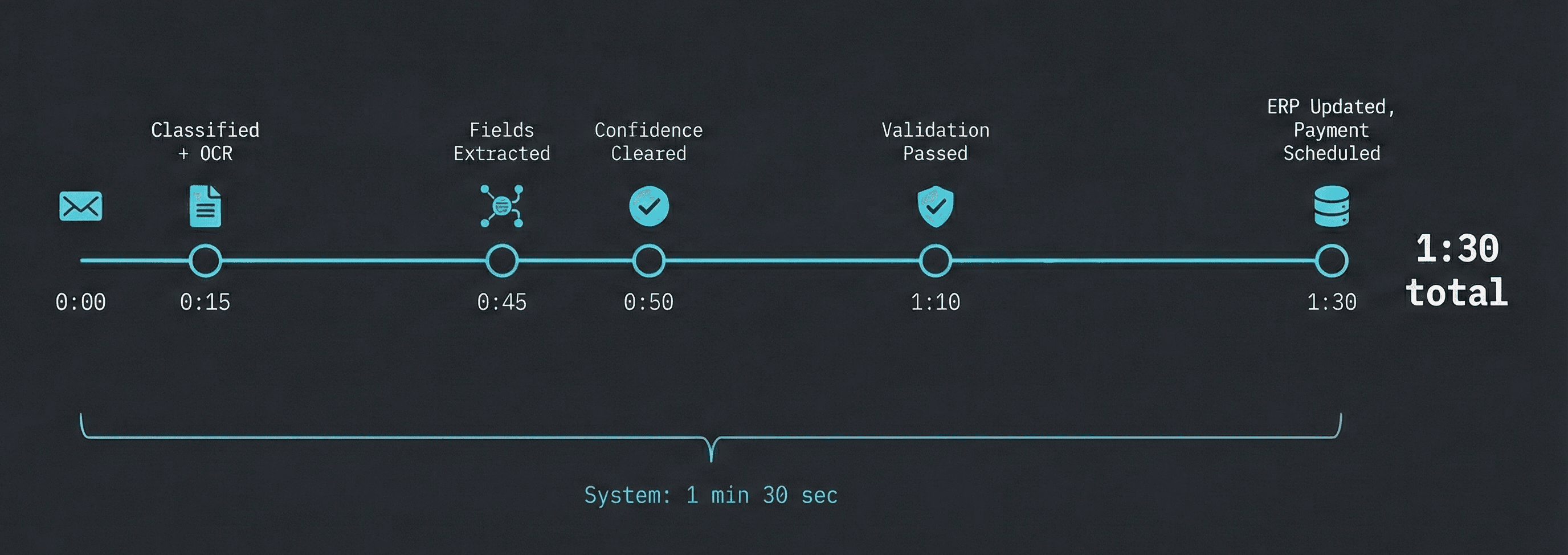
End to End: Email to Approved Payment in 4 Minutes
Quick walkthrough. Invoice processing.
Invoice arrives as a PDF in finance's inbox. Workflow detects it, classifies it as an invoice, runs OCR on the scan. AI extracts vendor, amount, terms, line items. All fields clear the confidence threshold. Business rules fire: approved vendor (pass), amount in range (pass), no duplicate (pass), matching PO found (pass). Amount exceeds $10K, so it routes to the finance manager via Slack. She approves in the notification. Data writes to ERP. Payment schedules. Audit log captures everything.
Four minutes. Zero custom code. Every step visible and changeable.
That is not a demo. That is a system.
The Pitfalls I Have Personally Stepped In
Trusting extraction without validation. High confidence is not infallible. Build checkpoints. Catching errors in validation costs nothing compared to catching them after the wire transfer.
Coupling to templates. If your logic breaks when a layout changes, you have built a fragile system with an AI label. Not the same thing.
Ignoring the long tail. First 80% of documents are easy. Last 20% will eat 80% of your maintenance time. Design for them on day one, not in "Phase 2" which we both know is code for "never."
Skipping feedback loops. Without corrections flowing back, accuracy is frozen. With them, it compounds weekly. One is a project. The other is a system.
Build the Thing
Four layers. Ingestion, AI Processing, Validation and Routing, Integration. That is the architecture for an intelligent document processing workflow that works in production.
You do not have to start from scratch. We have built templates for the most common document processing workflows (invoices, contracts, support tickets, onboarding forms) so you can start with a working architecture and customize from there. Drag, configure, ship. Not "spend three sprints building the scaffolding before you can test your first document."
Try the workflow builder. Pick a template. Process your first batch of documents today instead of next quarter.
Stop maintaining scripts. Start building systems.
Written by
Sagnik Ghosh
Created At
Fri Feb 06 2026
Updated At
Sat Feb 07 2026